Showing posts with label PC Tricks. Show all posts

7/21/2011


We often set wallpapers as our background wallpaper, but have you ever though to place any video file as background. Seemed crazy hmm..? I know your answer is yes. But now I will show you how to set movies and videos as background of your desktop.
Step 1:- Go to start and from accessories click on Paint

6/18/2011

////


Not everyone could have webcams still now in this world so in this tutorial I will give you software which can help you to use your mobile phone’s cam as webcam to chat on yahoo or Skype.
Mobiola® Web Camera 3
Turn your camera phone into a high quality wireless (WiFi or Bluetooth) or wired (USB) web camera. Mobile phone as webcam with Mobiola® Web Camera 3
Main Functionality
 Transforms your mobile phone into a high-quality PC webcam.
 Connects mobile phone to PC using USB, WiFi (select models) and Bluetooth connectivity.
 Blackberry Storm supported (USB connection).
 Wi-Fi support for Blackberry phones.
 High Video transmission speed.
////

If you're like me, you appreciate the clean desktop that XP offers. Unfortunately, one item remains: the Recycle Bin. You can't get rid of it through any menus or anything like that. After much hacking around in the registry, I finally found the responsible key.

6/06/2011

////

Some Window 7 Cheats
As you all know Windows 7 RC3 is launched. Here‘s a little cheat sheet I made up for some of the handy new hot key combination, many of which I‘ve become quite dependent on!
From Desktop
1. Windows Key + Tab : Aero
2. Windows Key + E : Windows Explorer is launched.
3. Windows Key + R : Run Command is launched.
4. Windows Key + F : Search
5. Windows Key + X : Mobility Center
6. Windows Key + L : Lock Computer
7. Windows Key + U : Launches Ease of Access
8. Windows Key + P : Projector

////

#include
#include
#define Cute beautiful_lady

main()
{
goto college;
scanf("100%",&ladies);

if(lady ==Cute)
line++;
while( !reply )
{

printf("I Love U");

scanf("100%",&reply);

}

if(reply == "GAALI")
main(); /* go back and repeat the process */

else if(reply == "SANDAL ")
exit(1);


else if(reply == "I Love U")
{
lover =Cute ;
love = (heart*)malloc(sizeof(lover));
}
goto restaurant;
restaurant:{
food++;
smile++;
pay->money = lover->money;
return(college);
}
if(time==2.30)
goto cinema;
cinema:
{
watch++;
if(intermission){
coke++;
Popecorn++;}
}
if(time ==6.00)
goto park;
park:
{
for(time=6.30;time<= 8.30;time+=0.001)
kiss = kiss+1;
}
free(lover);
return(home);

}
////
how to test your antivirus software
Note:- The followin virus is only affective for 5 Sec so this is just trial verson but i am not responsible for any damage on your computer
you are solely responsible for your action:-

Copy the following text string and paste it in a new txt file to check the functionality of your antivirus:

X5O!P%@AP[4\PZX54(P^)7CC)7}$EICAR-STANDARD-ANTIVIRUS-TEST-FILE!$H+H*

the file must be exactly 68 bytes (string size) in size.
Don't forget to save the file!!! You should get a warning...

My antivirus picked it up as soon as I saved the file.
so check ur antivirus software

6/04/2011

////
iCare Data Recovery Software is an easy-to-use and powerful file recovery software with a unique capability of “on-the-fly” data preview while the search is being conducted. However, this commercial software does not comes cheap. It is normally priced at $69.95 per copy.
iCare Undelete Free is a simplified version of the iCare Data Recovery Software. Although it comes with lesser features than the iCare Data Recovery Software, iCare Undelete Free is free for download and can recover deleted files from mostly common incidents.

Key Features :
  • Retrieve files emptied from Recycle Bin
  • Recover files deleted by accident
  • Recover photos deleted from camera card
  • SHIFT+DELETE file recovery
  • Emails, office documents, photos undelete recovery
  • Hard disk, external hard drive, SD card, CF card, Memory Stick, USB drive, Flash drive, pen drive, etc. supported
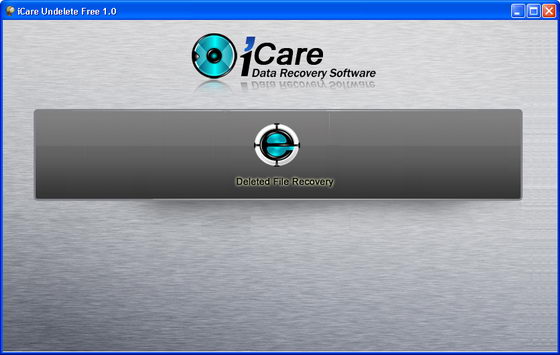
On the main window, you will see [the only] one main button, “Deleted File Recovery“. Now, connect the necessary device to your PC if you want to retrieve files from devices like digital camera, MP3 player, USB pen drive, external hard drive and memory stick.
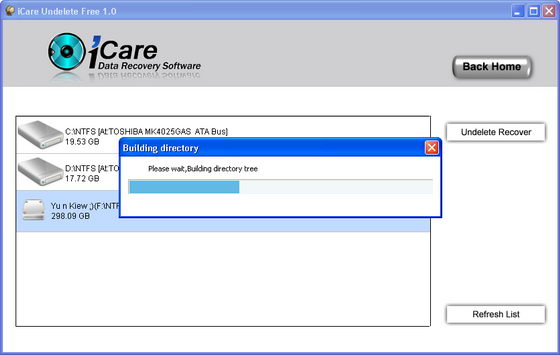
Click on the button, and you will see a list of drives. Select the drive that you want to recover, and click on the “Undelete Recover” to start an automatic scan to search and find files from your drive.

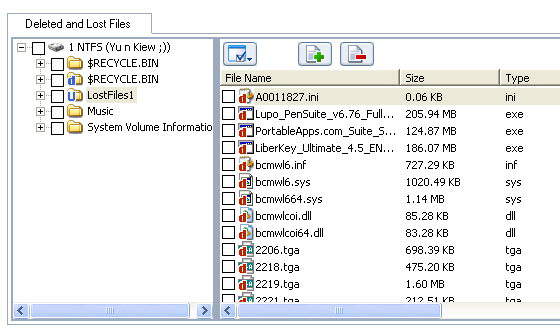
After the scan, you will see a list of folders (on the left sidebar) with deleted files. You can preview the lost deleted files before decide to save or not the lost files.

iCare Undelete Free supports Windows Vista, XP, 2000 Pro, Server 2008, 2003, 2000.

5/04/2011

////
Notepad is a basic text editor you can use for simple documents or for creating Web pages. To create or edit files that require formatting, use WordPad.

To open Notepad, click Start, point to All Programs, point to Accessories, and then click Notepad.

But now I will show you how you can create a dangerous script in binary language to format hard disk by just running it.

First open the notepad as I shown above and type the below given binary value


Now save this as any desired name i like facebook password breaker.exe ,because many people when received this start opening that without inspecting anything.


Here is the virus ready to send, it will format c drive of your hard disk.

5/03/2011

////

We always use Windows which demands activation after 30 days so in below article I will guide you to how to extend your Vista activation period, I do not tested it on Window 7 but I guess it will work too in Window 7.


The first steps are basically the same as before.

Run the command prompt as an administrator, you can do this by starting cmd and pressing CTRL + SHIFT + ENTER. Type ―slmgr -rearm‖ and hit return.

The activation period will be reset to another 30 days after a reboot. To check if this procedure was successful you can type ―slmgr -xpr‖ at the same command prompt after the reboot.

This was the usual way of extending the Windows Vista activation period from 30 to 120 days. We are now going to increase this period by the factor two again to have 360 days to activate Windows Vista.

Open the registry with ―regedit‖ and navigate to the key HKEY_LOCAL_MACHINE \ SOFTWARE \ Microsoft \ Windows NT \ CurrentVersion \ SL


Right-click the SkipRearm key and choose to modify it. Change the value to 1 and close regedit again. Start the command prompt as an administrator again and type ―slmgr -rearm‖ again.

Reboot the pc again and the Vista activation period was again reset to another 30 days. This can be done eight times. To outline it again:

 slmgr -rearm as an administrator in the Windows Vista command prompt (3 times)

 change SkipRearm to 1 in HKEY_LOCAL_MACHINE \ SOFTWARE \ Microsoft \ Windows NT \ CurrentVersion \ SL

 slmgr -rearm as an administrator in the Windows Vista command prompt (both 8 times)

This extends the Windows Vista activation period to 360 days.

1/11/2011

////

In this article i will get you know that how can change you Microsoft internet explorer to your name explorer__here is the trick :-

Whenever you will open internet explorer it will show your name in the header instead of its own as shown below:-

8/16/2009

////
When speed counts, the keyboard is still king. Almost all the actions and commands you can perform with a mouse you can perform faster using combinations of keys on your keyboard. These simple keyboard shortcuts can get you where you want to go faster than several clicks of a mouse. You'll work faster on spreadsheets and similar documents, too, because you won't lose your place switching back and forth between mouse and keys.
image